> ## Documentation Index
> Fetch the complete documentation index at: https://whitepaper.flowstate.exchange/llms.txt
> Use this file to discover all available pages before exploring further.
# Integration Overview
> Technical reference for integrating C1 Pools as a liquidity source
This page is the developer-facing reference for integrating C1 Pools. FlowState exposes two integration surfaces:
* **On-chain layer.** Solidity contracts for aggregators, liquidators, market makers and any protocol settling trades through C1 Pools directly. Standard EVM calls, atomic settlement, no off-chain dependencies.
* **API layer.** GraphQL primary, REST mirror. For UI integrators, vesting platforms, indexers and services that need pool discovery, off-chain orchestration and historical settlement data.
Most integrations use one or the other. Aggregator routing is purely on-chain. Vesting platforms and trading front-ends are primarily API. Lending protocols may use both.
## Integration paths
Add C1 Pools to a smart order router as a liquidity source. On-chain layer, standard registry interface, 0.30% fee share.
Use C1 Pools as a liquidation route for collateral disposal. On-chain layer, atomic with liquidation flow.
For market maker bots, OTC desks and custom protocols routing settlement through C1 Pools without an aggregator intermediary.
Deploy a C1 Pool for a specific token. For projects, foundations and large holders. Coordinated with the FlowState team.
## On-chain integration
Aggregators, liquidators and direct integrators interact with C1 Pools through standard EVM RPC. Pool addresses are discovered through the per-chain liquidity registry. Quotes and settlement happen in the same transaction.
### Liquidity registry
A single registry contract per chain holds the canonical list of deployed C1 Pools. The registry is permissionless and read-only. Integrators can:
* Look up the C1 Pool address for a specific token
* Enumerate all deployed pools on the chain
* Filter pools by available depth
* Verify whether a given address is a canonical FlowState pool
### C1 Pool interface
Every C1 Pool is a self-contained contract bound to a specific token. The same interface is exposed across every deployment. Integrators can:
* Query the current oracle price, available depth and circuit breaker state
* Read oracle source, last update and confidence interval for a pool
* Read deposited inventory by account
* Execute a buy at oracle price minus the protocol fee
* Deposit and withdraw inventory (for liquidity providers)
Final function signatures, selectors and the ABI are released to integration partners under onboarding, alongside the per-chain address set.
### Events
Every state change on a C1 Pool emits an event. Bots and indexers can subscribe via standard RPC websocket or query through the FlowState subgraph when live. Events cover:
* Inventory deposits and withdrawals
* Buyer settlements
* Oracle updates
* Circuit breaker activations
Final event names and parameter schemas are released to integration partners under onboarding.
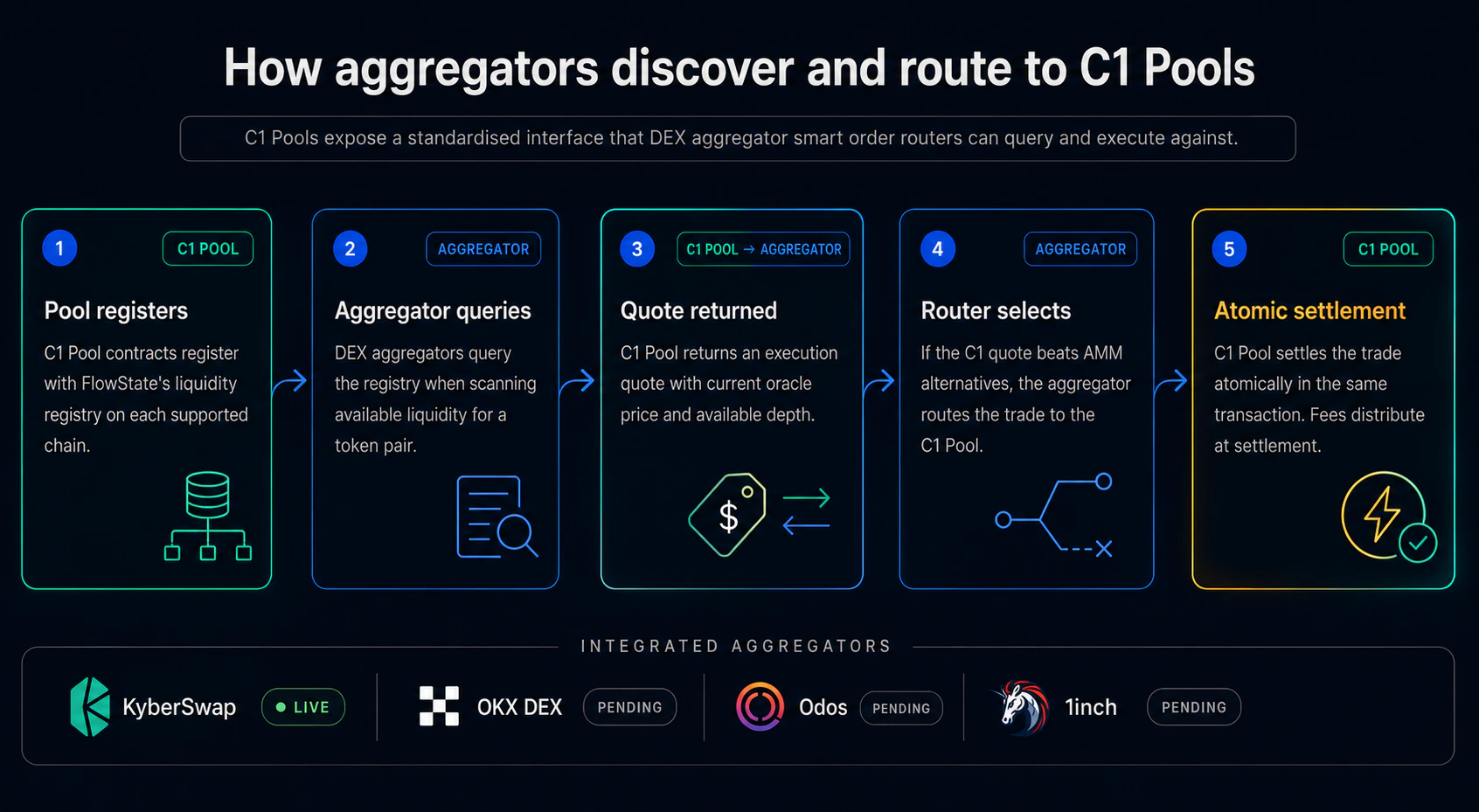
### Settlement flow
Query the FlowState liquidity registry on the target chain to get the C1 Pool address for the trade's token.
Call the pool's quote function. The pool returns the current oracle price, available depth and any active circuit breaker state.
The integrator's existing price comparison logic ranks the C1 quote against AMM and other routing options. For thin-liquidity tokens C1 is the best option whenever depth is available.
If C1 is selected, call the settlement function in the same transaction. Settlement is atomic and the 0.30% aggregator share is distributed at settlement.
 ## API integration
The API layer is for integrators who need pool discovery, off-chain orchestration or historical data without writing direct contract calls. GraphQL is the primary surface. A REST mirror is available for every mutation and query.
The API is in active development. Endpoint paths, input schemas and naming may evolve before release. The final reference is shared with integration partners under onboarding.
### Capabilities
The API exposes:
* **Pool discovery.** List and filter deployed pools by token, chain or depth
* **Pool state.** Read current oracle price, depth and circuit breaker status
* **Inventory operations.** Create a new pool, deposit and withdraw inventory
* **Trade execution.** Execute a buy from a C1 Pool, or settle an OTC block trade
* **Historical data.** Query settlement history by pool, account or token
### Authentication
API access requires a key issued through partnership onboarding. Keys are passed in a standard authorization header. Endpoint base URLs and the full authentication spec are shared with integration partners under onboarding.
### Rate limits
The API is rate-limited per key with separate buckets for read and write operations, plus a short-window burst allowance. Partners with higher throughput requirements (aggregator indexers, large vesting platforms) can request increased quotas through partnership onboarding.
### Errors
Standard error responses cover pool not found, duplicate pool deployment, insufficient ERC-20 allowance, unsupported chain and rate limit exceeded. Full error reference is shared under partnership onboarding.
## Supported chains
| Chain | C1 Pool deployment | Registry |
| ---------------- | ------------------ | -------- |
| Ethereum mainnet | Yes | Yes |
| Arbitrum | Yes | Yes |
| Base | Yes | Yes |
| BNB Chain | Yes | Yes |
Solana support is delivered through a separate brand, **Oasis**, on its own roadmap and contract architecture. Cross-chain expansion to additional EVM L2s and emerging chains is underway. See [Roadmap](/token-protocol/roadmap).
## Contract addresses
Per-chain C1 Pool factory and registry addresses are released to integration partners under standard onboarding. Contact [partnerships@flowstate.exchange](mailto:partnerships@flowstate.exchange) for the current address set and the interface specifications.
## Component status
| Component | Status |
| -------------------------- | --------------------------------------------------------------- |
| C1 Pool contracts (EVM) | Deployed and live, first audit complete, second round to follow |
| Liquidity registry (EVM) | Deployed |
| Aggregator quote interface | Production |
| KyberSwap routing | Live |
| GraphQL and REST API | In active development |
| Subgraph | In progress |
| Sandbox / testnet | Available on request |
For early access to any of the above, contact us at [partnerships@flowstate.exchange](mailto:partnerships@flowstate.exchange).
Contact details, support channels and partnership process.
## API integration
The API layer is for integrators who need pool discovery, off-chain orchestration or historical data without writing direct contract calls. GraphQL is the primary surface. A REST mirror is available for every mutation and query.
The API is in active development. Endpoint paths, input schemas and naming may evolve before release. The final reference is shared with integration partners under onboarding.
### Capabilities
The API exposes:
* **Pool discovery.** List and filter deployed pools by token, chain or depth
* **Pool state.** Read current oracle price, depth and circuit breaker status
* **Inventory operations.** Create a new pool, deposit and withdraw inventory
* **Trade execution.** Execute a buy from a C1 Pool, or settle an OTC block trade
* **Historical data.** Query settlement history by pool, account or token
### Authentication
API access requires a key issued through partnership onboarding. Keys are passed in a standard authorization header. Endpoint base URLs and the full authentication spec are shared with integration partners under onboarding.
### Rate limits
The API is rate-limited per key with separate buckets for read and write operations, plus a short-window burst allowance. Partners with higher throughput requirements (aggregator indexers, large vesting platforms) can request increased quotas through partnership onboarding.
### Errors
Standard error responses cover pool not found, duplicate pool deployment, insufficient ERC-20 allowance, unsupported chain and rate limit exceeded. Full error reference is shared under partnership onboarding.
## Supported chains
| Chain | C1 Pool deployment | Registry |
| ---------------- | ------------------ | -------- |
| Ethereum mainnet | Yes | Yes |
| Arbitrum | Yes | Yes |
| Base | Yes | Yes |
| BNB Chain | Yes | Yes |
Solana support is delivered through a separate brand, **Oasis**, on its own roadmap and contract architecture. Cross-chain expansion to additional EVM L2s and emerging chains is underway. See [Roadmap](/token-protocol/roadmap).
## Contract addresses
Per-chain C1 Pool factory and registry addresses are released to integration partners under standard onboarding. Contact [partnerships@flowstate.exchange](mailto:partnerships@flowstate.exchange) for the current address set and the interface specifications.
## Component status
| Component | Status |
| -------------------------- | --------------------------------------------------------------- |
| C1 Pool contracts (EVM) | Deployed and live, first audit complete, second round to follow |
| Liquidity registry (EVM) | Deployed |
| Aggregator quote interface | Production |
| KyberSwap routing | Live |
| GraphQL and REST API | In active development |
| Subgraph | In progress |
| Sandbox / testnet | Available on request |
For early access to any of the above, contact us at [partnerships@flowstate.exchange](mailto:partnerships@flowstate.exchange).
Contact details, support channels and partnership process.